Form Models
🌐 एआई और मनुष्यों द्वारा किया गया अनुवाद
यह अनुवाद मनुष्यों के मार्गदर्शन में एआई द्वारा किया गया है। 🤝
इसमें मूल अर्थ को गलत समझने या अप्राकृतिक लगने आदि जैसी गलतियाँ हो सकती हैं। 🤖
आप हमें एआई LLM को बेहतर मार्गदर्शन करने में मदद करके इस अनुवाद को बेहतर बना सकते हैं।
आप FastAPI में form fields declare करने के लिए Pydantic models का उपयोग कर सकते हैं।
नोट
forms का उपयोग करने के लिए, पहले python-multipart install करें।
इसे अपने project में जोड़ें:
$ uv add python-multipart
नोट
यह FastAPI version 0.113.0 से supported है। 🤓
Forms के लिए Pydantic Models
आपको बस उन fields के साथ एक Pydantic model declare करना है जिन्हें आप form fields के रूप में receive करना चाहते हैं, और फिर parameter को Form के रूप में declare करना है:
from typing import Annotated

from fastapi import FastAPI, Form
from pydantic import BaseModel

app = FastAPI()


class FormData(BaseModel):
    username: str
    password: str


@app.post("/login/")
async def login(data: Annotated[FormData, Form()]):
    return data
🤓 Other versions and variants
Tip
Prefer to use the Annotated version if possible.
from fastapi import FastAPI, Form
from pydantic import BaseModel

app = FastAPI()


class FormData(BaseModel):
    username: str
    password: str


@app.post("/login/")
async def login(data: FormData = Form()):
    return data
FastAPI request में मौजूद form data से हर field के लिए data extract करेगा और आपको वह Pydantic model देगा जिसे आपने define किया है।
HTML checkboxes के लिए, boolean fields को False की default value के साथ declare करें।
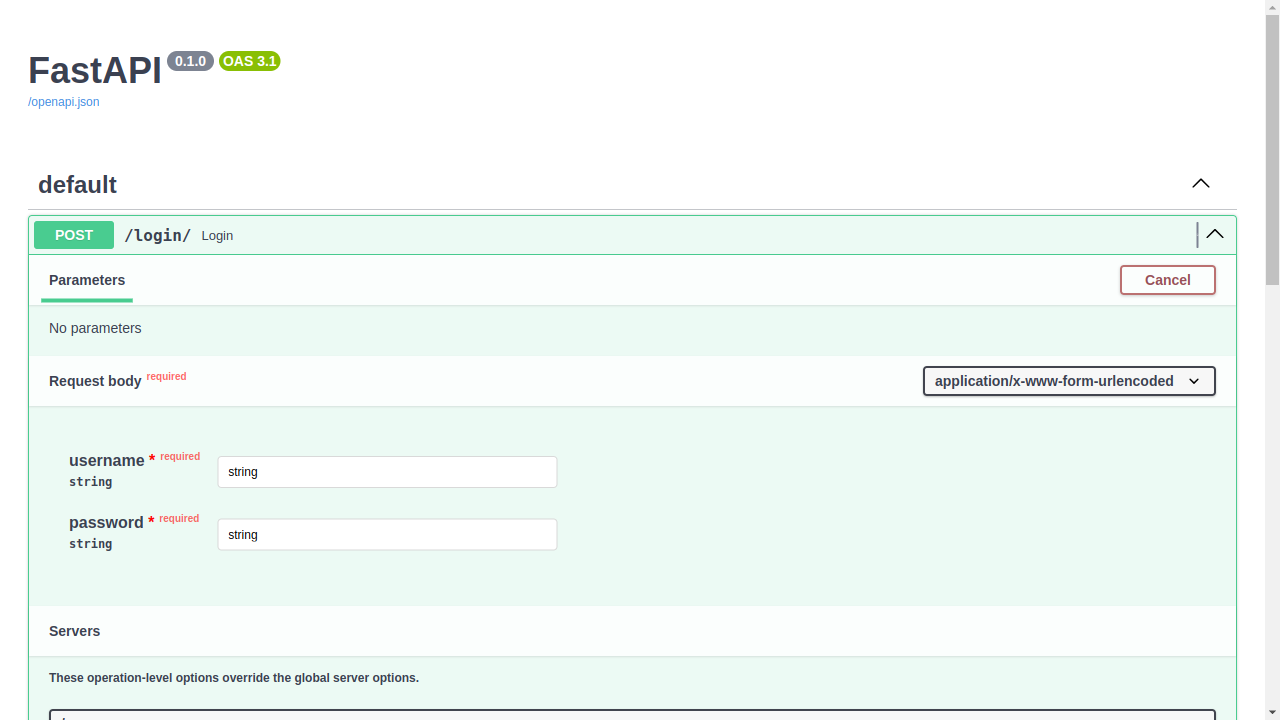
Docs जाँचें
आप इसे /docs पर docs UI में verify कर सकते हैं:
Extra Form Fields को मना करें
कुछ खास use cases में (शायद बहुत आम नहीं), आप form fields को केवल उन तक restrict करना चाह सकते हैं जो Pydantic model में declare किए गए हैं। और किसी भी extra fields को forbid करना चाह सकते हैं।
नोट
यह FastAPI version 0.114.0 से supported है। 🤓
आप किसी भी extra fields को forbid करने के लिए Pydantic की model configuration का उपयोग कर सकते हैं:
from typing import Annotated

from fastapi import FastAPI, Form
from pydantic import BaseModel

app = FastAPI()


class FormData(BaseModel):
    username: str
    password: str
    model_config = {"extra": "forbid"}


@app.post("/login/")
async def login(data: Annotated[FormData, Form()]):
    return data
🤓 Other versions and variants
Tip
Prefer to use the Annotated version if possible.
from fastapi import FastAPI, Form
from pydantic import BaseModel

app = FastAPI()


class FormData(BaseModel):
    username: str
    password: str
    model_config = {"extra": "forbid"}


@app.post("/login/")
async def login(data: FormData = Form()):
    return data
अगर कोई client कुछ extra data भेजने की कोशिश करता है, तो उन्हें एक error response मिलेगा।
उदाहरण के लिए, अगर client ये form fields भेजने की कोशिश करता है:
username:Rickpassword:Portal Gunextra:Mr. Poopybutthole
तो उन्हें एक error response मिलेगा जो बताएगा कि field extra allowed नहीं है:
{
    "detail": [
        {
            "type": "extra_forbidden",
            "loc": ["body", "extra"],
            "msg": "Extra inputs are not permitted",
            "input": "Mr. Poopybutthole"
        }
    ]
}
Form Models को संयोजित करें
आप कई form models को अलग-अलग Form parameters के साथ संयोजित कर सकते हैं।
from typing import Annotated

from fastapi import FastAPI, Form
from pydantic import BaseModel

app = FastAPI()


class Profile(BaseModel):
    name: str


class Preferences(BaseModel):
    tags: list[str] = []


@app.post("/profiles/")
async def create_profile(
    profile: Annotated[Profile, Form()],
    preferences: Annotated[Preferences, Form()],
    token: Annotated[str, Form()],
):
    return {"profile": profile, "preferences": preferences, "token": token}
🤓 Other versions and variants
Tip
Prefer to use the Annotated version if possible.
from fastapi import FastAPI, Form
from pydantic import BaseModel

app = FastAPI()


class Profile(BaseModel):
    name: str


class Preferences(BaseModel):
    tags: list[str] = []


@app.post("/profiles/")
async def create_profile(
    profile: Profile = Form(),
    preferences: Preferences = Form(),
    token: str = Form(),
):
    return {"profile": profile, "preferences": preferences, "token": token}
client name, tags, और token को form fields के रूप में भेजता है। हर model form fields को स्वतंत्र रूप से validate करता है।
हर model की extra configuration सभी form fields पर लागू होती है, जिनमें अन्य parameters या dependencies में declare किए गए fields और files भी शामिल हैं। extra="forbid" के साथ, उस model से बाहर का कोई भी field अस्वीकार कर दिया जाता है। extra="allow" के साथ, वे fields model extras के रूप में शामिल किए जाते हैं।
अगर कई declarations एक ही form field नाम का उपयोग करते हैं, तो हर declaration उस field की value को validate करता है। साझा fields के लिए संगत types और constraints का उपयोग करें ताकि OpenAPI schema उनका सुसंगत रूप से वर्णन कर सके।
वैकल्पिक Form Models
समूह को वैकल्पिक बनाने के लिए, form model को | None और None की default value के साथ declare करें।
from typing import Annotated

from fastapi import FastAPI, Form
from pydantic import BaseModel

app = FastAPI()


class Profile(BaseModel):
    name: str
    age: int


@app.post("/profiles/")
async def create_profile(
    token: Annotated[str, Form()],
    profile: Annotated[Profile | None, Form()] = None,
):
    return {"token": token, "profile": profile}
🤓 Other versions and variants
Tip
Prefer to use the Annotated version if possible.
from fastapi import FastAPI, Form
from pydantic import BaseModel

app = FastAPI()


class Profile(BaseModel):
    name: str
    age: int


@app.post("/profiles/")
async def create_profile(
    token: str = Form(),
    profile: Profile | None = Form(default=None),
):
    return {"token": token, "profile": profile}
अगर न तो name और न ही age भेजा जाता है, तो profile की value None होती है। अगर इनमें से कोई भी भेजा जाता है, तो FastAPI model को validate करता है और दोनों fields को required मानता है। खाली value सबमिट करना भी field प्रदान करना माना जाता है।
default value के बिना | None का उपयोग करने पर भी parameter required रहता है।
Extra fields model की extra configuration का पालन करते हैं। अनदेखा किए गए extras से model को मौजूद नहीं माना जाता।
केवल unchecked checkboxes वाला वैकल्पिक model छोड़ दिया जाता है। इसे स्पष्ट रूप से प्रदान करने के लिए enabled=false जैसी value भेजें।
Form Models के वैकल्पिक Unions
आप models के वैकल्पिक union का भी उपयोग कर सकते हैं।
from typing import Annotated, Literal

from fastapi import FastAPI, Form
from pydantic import BaseModel

app = FastAPI()


class Person(BaseModel):
    kind: Literal["person"]
    name: str


class Company(BaseModel):
    kind: Literal["company"]
    company_name: str


@app.post("/contacts/")
async def create_contact(
    contact: Annotated[Person | Company | None, Form(discriminator="kind")] = None,
):
    return contact
🤓 Other versions and variants
Tip
Prefer to use the Annotated version if possible.
from typing import Literal

from fastapi import FastAPI, Form
from pydantic import BaseModel

app = FastAPI()


class Person(BaseModel):
    kind: Literal["person"]
    name: str


class Company(BaseModel):
    kind: Literal["company"]
    company_name: str


@app.post("/contacts/")
async def create_contact(
    contact: Person | Company | None = Form(default=None, discriminator="kind"),
):
    return contact
अगर कोई form fields नहीं भेजे जाते हैं, तो contact की value None होती है। name के साथ kind=person, या company_name के साथ kind=company भेजें। discriminator चुनता है कि किस model को validate करना है।
Form Models के Unions को संयोजित करें
आप unions को अन्य form models, अलग-अलग Form parameters, और File parameters के साथ संयोजित कर सकते हैं। हर union को स्वतंत्र रूप से validate किया जाता है।
from typing import Annotated, Literal

from fastapi import FastAPI, Form
from pydantic import BaseModel

app = FastAPI()


class Person(BaseModel):
    contact_type: Literal["person"]
    name: str


class Company(BaseModel):
    contact_type: Literal["company"]
    company_name: str


class Email(BaseModel):
    notification_type: Literal["email"]
    email: str


class SMS(BaseModel):
    notification_type: Literal["sms"]
    phone: str


@app.post("/contacts/")
async def create_contact(
    contact: Annotated[Person | Company, Form(discriminator="contact_type")],
    token: Annotated[str, Form()],
    notification: Annotated[
        Email | SMS | None, Form(discriminator="notification_type")
    ] = None,
):
    return {"contact": contact, "notification": notification, "token": token}
🤓 Other versions and variants
Tip
Prefer to use the Annotated version if possible.
from typing import Literal

from fastapi import FastAPI, Form
from pydantic import BaseModel

app = FastAPI()


class Person(BaseModel):
    contact_type: Literal["person"]
    name: str


class Company(BaseModel):
    contact_type: Literal["company"]
    company_name: str


class Email(BaseModel):
    notification_type: Literal["email"]
    email: str


class SMS(BaseModel):
    notification_type: Literal["sms"]
    phone: str


@app.post("/contacts/")
async def create_contact(
    contact: Person | Company = Form(discriminator="contact_type"),
    token: str = Form(),
    notification: Email | SMS | None = Form(
        default=None, discriminator="notification_type"
    ),
):
    return {"contact": contact, "notification": notification, "token": token}
सभी fields एक ही form में भेजें। उदाहरण के लिए, contact_type=person, name=Rick, notification_type=email, email=rick@example.com, और token=secret भेजें।
notification की value None रखने के लिए notification fields छोड़ दें।
Form Models और Files
आप form model को file parameters के साथ भी संयोजित कर सकते हैं।
from typing import Annotated

from fastapi import FastAPI, Form, UploadFile
from pydantic import BaseModel

app = FastAPI()


class Profile(BaseModel):
    name: str


@app.post("/profiles/")
async def create_profile(profile: Annotated[Profile, Form()], avatar: UploadFile):
    return {"profile": profile, "filename": avatar.filename}
🤓 Other versions and variants
Tip
Prefer to use the Annotated version if possible.
from fastapi import FastAPI, File, Form, UploadFile
from pydantic import BaseModel

app = FastAPI()


class Profile(BaseModel):
    name: str


@app.post("/profiles/")
async def create_profile(profile: Profile = Form(), avatar: UploadFile = File()):
    return {"profile": profile, "filename": avatar.filename}
यहाँ client multipart/form-data का उपयोग करके name field और avatar file भेजता है।
सारांश
आप FastAPI में form fields declare करने के लिए Pydantic models का उपयोग कर सकते हैं। 😎